Anthropic Published How to Build an Always-On Agent.
An event inbox, timers, memory, permissions, an outbox. The model loop is unchanged, and a prompt at the end builds the smallest working version.
On Friday 13 November Anthropic published an engineering article by William Hu called Building always-on agents, and the first thing it does is take the name back. An always-on agent is not a process sitting in a loop watching the world. It is asleep almost all of the time. What wakes it is a row in a database table.
The rest of the article is the operations problem nobody writes down: an event inbox, timers, memory, permissions, an outbox.
An always-on agent is an ordinary agent loop that sleeps, wakes on an event, works for a minute and writes down what happened. Nothing about the model changes.
Five things wrap that loop: an event inbox that wakes it, timers that feed the inbox, memory that survives the run, permissions that decide what it may do alone, and an outbox that reaches a person who was not watching.
All five are tables, files and one worker. You can have a working one by Sunday.
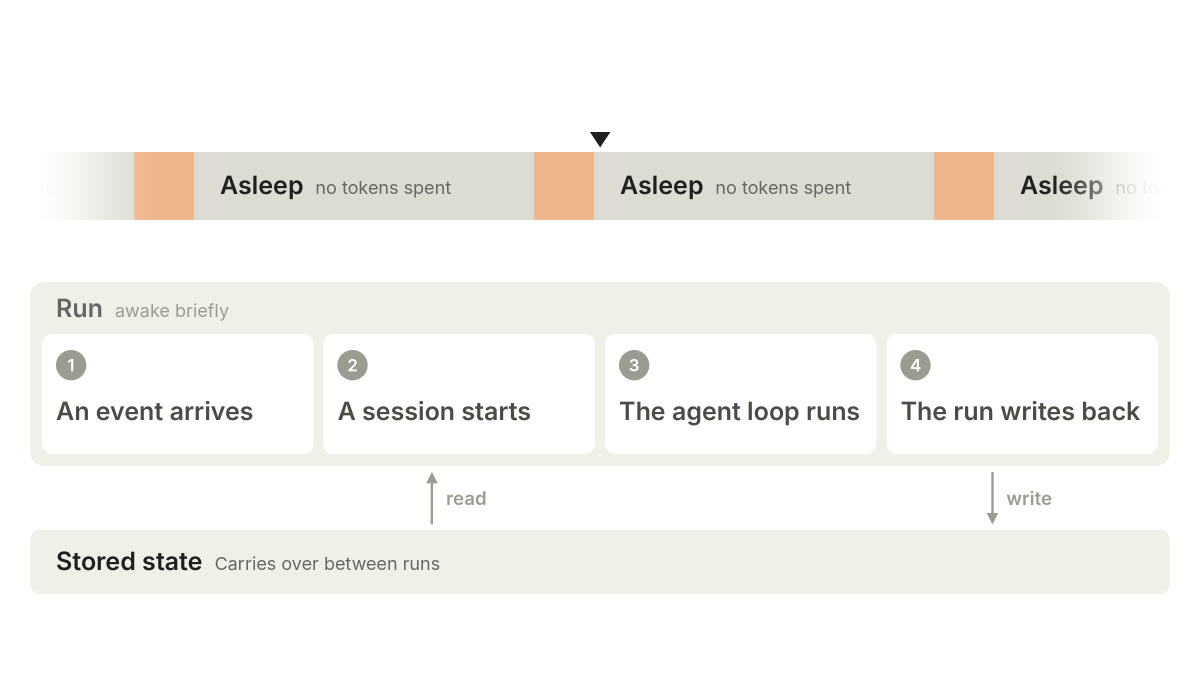
A still from the opening animated diagram in Anthropic's article, Building always-on agents, 13 November 2026.
Five parts. The model is not one of them.
That is the whole argument, and it is worth sitting with before the implementation detail. The agent loop inside an always-on agent is the same loop that runs inside a chat window. Same model, same tool calls, same transcript. What makes it always-on is everything wrapped around that loop: what wakes it, what it remembers, what it is allowed to touch, and how its output reaches a person who was not watching.
If you have tried to build one of these and it kept forgetting things, double-posting, or going quiet for a day, the diagnosis is in that list. Not in the prompt.
What follows is the design, part by part, with Anthropic's own diagrams. Then the part the article leaves to you: the smallest version worth building this week, a prompt that scaffolds it, and the three mistakes to avoid.
Why now
Persistent agents have been possible and uneconomic for two years. The second half of that changed.
A run that wakes ten times a day on a long task bills like one. Two things moved: models got better at judging when to act and when to stay quiet, which is the whole job of an unattended agent, and long-horizon work got disproportionately cheaper.
Anthropic puts a number on the second. On one long-horizon coding benchmark it reports Opus 5.5 at 78% less per solved task than Opus 5, against 40% less on typical workloads. The agent that wakes up all day got cheaper roughly twice as fast as the agent you sit and watch.
Two words carry the whole design
A run is one waking. A session is the transcript it happens inside. Neither is where state lives.
Runs are short: one event handled, start to finish. Sessions span many of them and are eventually thrown away. So state that matters cannot live in either. It lives in storage, outside both, which is why memory is its own part.
The whole design on one screen
The rest of this post is this table, with the reasoning behind each row.
| Part | What it does | Build first | The mistake |
|---|---|---|---|
| Event inbox | One durable table that every wake-up goes through, whatever woke it | The table, and exactly one worker reading it | Two workers on one inbox |
| Timers | Follow-ups the agent sets itself, and schedules that recur | A second table, and a scheduler that writes into the inbox | Letting a timer start a run |
| Memory | The only state that survives the run, held as files | instructions.md, index.md, reported.md | Letting the session be the memory |
| Permissions | What it may do with nobody watching, and how it asks | Three columns on paper: auto, ask, never | Asking the user about everything |
| Outbox | How a person who was not watching finds out | One channel, capped at one message a day | Shipping it loud |
Part 1. The event inbox
One table that every wake-up goes through. Build it before you build the agent.
Everything that could wake the agent goes into one durable table first: a webhook, a message someone typed, a timer coming due, a job finishing. A handler writes the row and returns. One worker reads rows and starts runs.
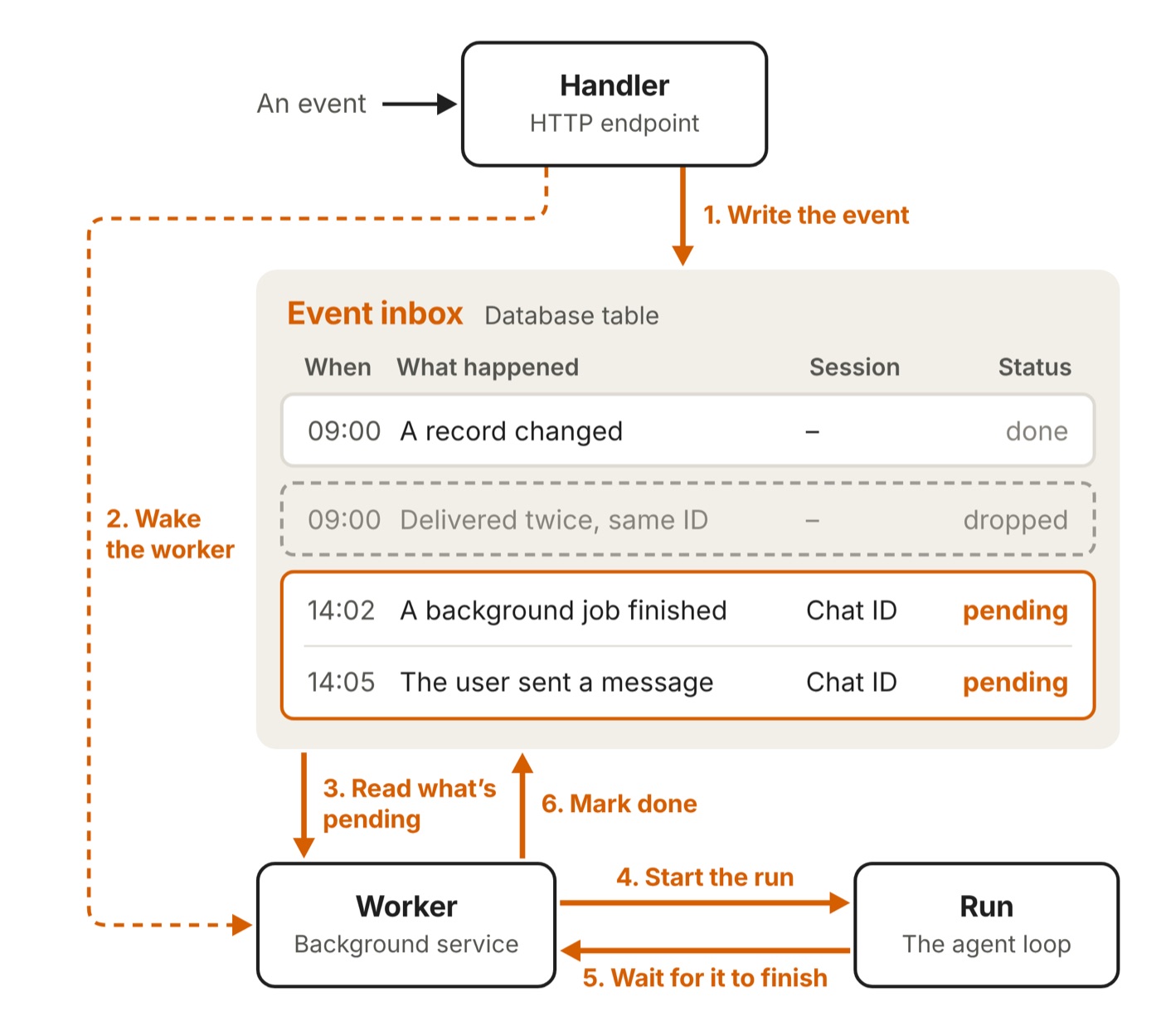
The table is the design. Diagram from Anthropic's Building always-on agents, 13 November 2026.
That indirection is the design, and the one teams skip. Four things fall out of it.
- The handler answers fast, because accepting an event and acting on it are now separate steps.
- Crashes stop being data loss. Each row carries its status, so a fresh worker picks up what was unfinished.
- Duplicates die at the door. Anything that delivers at least once will eventually deliver twice. Store the upstream id, reject the repeat.
- One worker per inbox. Two workers means two runs editing the same memory, each blind to the other. This is the bug that reads as the agent losing its mind.
Batching then comes free. Three events waiting is one run with three things in it, not three runs that each half-understand the situation.
The hard case is an event landing while a run is going. Queue it, fold it in, or interrupt and restart. Queueing looks slow. Folding is awkward once the run has acted on the old picture. Interrupting is correct and expensive. Choose, because the accidental default is queueing.
Build first One table, one worker, and a rejection on the upstream id.
Part 2. Timers
They live in their own table, and they never start a run themselves.
Two kinds. A follow-up is a deadline the agent sets itself: check on Thursday whether this reply came back. A schedule recurs, and has to remember where it is in the sequence.
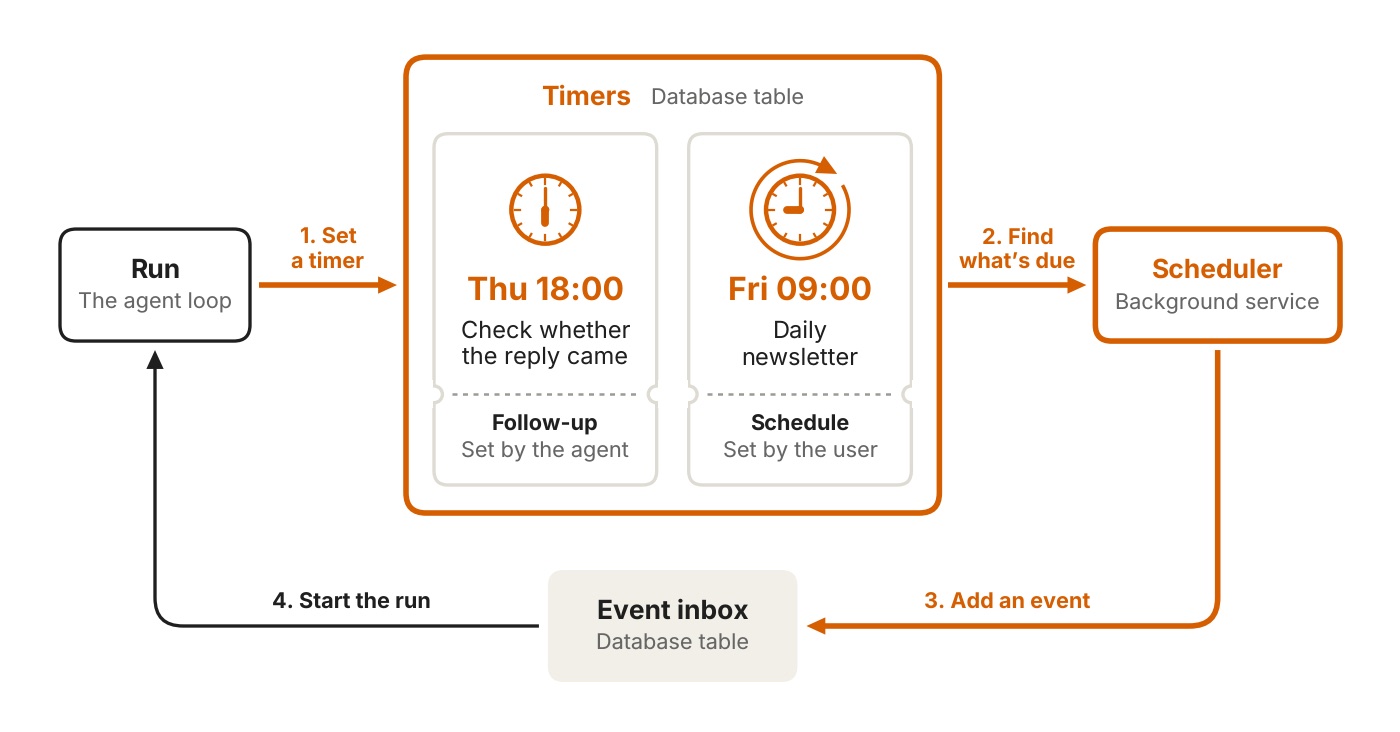
Why the two tables stay apart. Diagram from Anthropic's Building always-on agents, 13 November 2026.
A scheduler polls the table, finds what is due, advances it, and only then writes a row into the inbox. The inbox stays a log of what happened. The timer table is a list of what will.
The reason to keep them apart is not purity. A timer is mutable until it fires. An event never is.
Build first A second table, and a scheduler pass that writes into the inbox.
Part 3. Memory
Files, not a vector database. Store only what cannot be looked up anywhere else.
Memory is a file directory, backed by a database or object store so it survives the worker. Not a vector index by default, not a graph. Files.
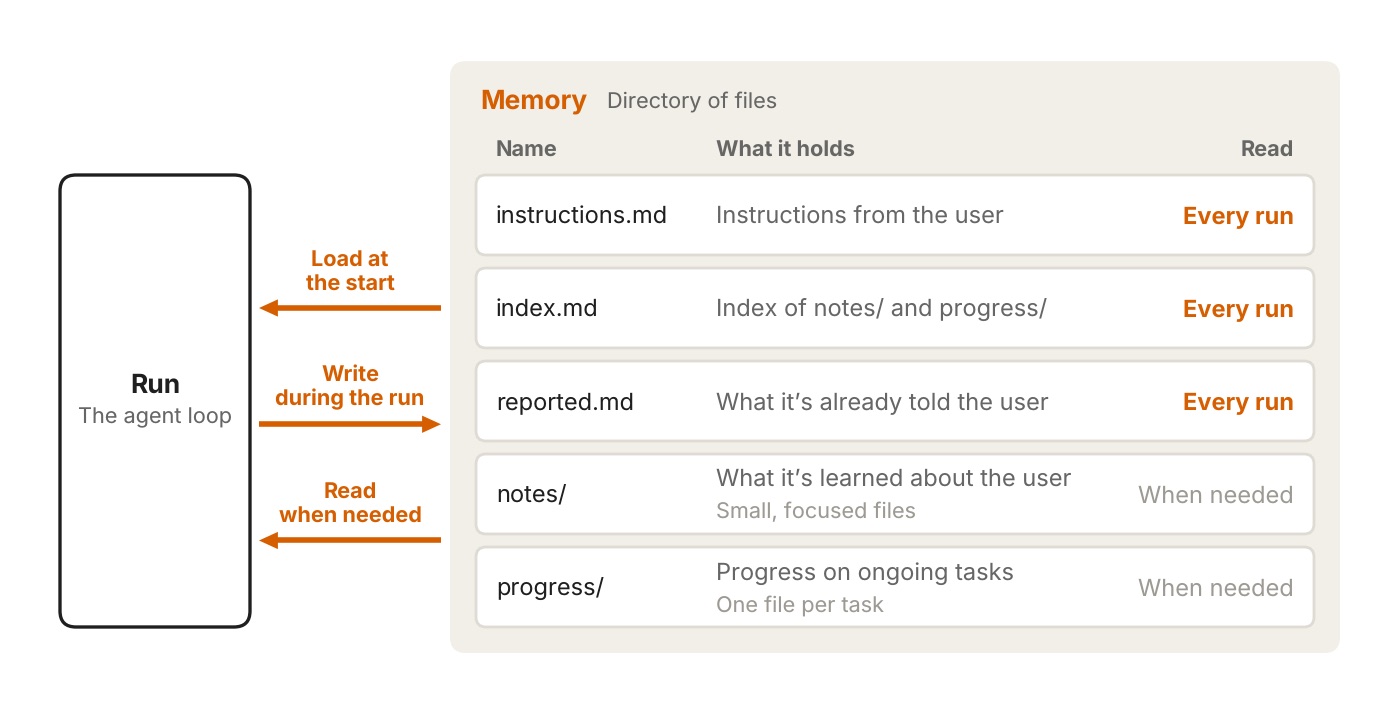
The whole memory system, as Anthropic draws it. Diagram from Anthropic's Building always-on agents, 13 November 2026.
One rule keeps it small: store only what cannot be looked up elsewhere. The ticket does not go in memory, the ticket id does. That is the difference between a store you can still read in March and a transcript dump with search bolted on.
Four things qualify: how the person wants the agent to behave, what it has learned about them, what it has already told them, and where each open task stands. The first three load every run, so they stay short.
If that layout looks like a CLAUDE.md and a folder of notes, that is the point. We have argued before that the constraint is context, not the model. Here the argument arrives as a schema.
One optional piece is undersold by its name: dreaming, a separate pass that rereads old sessions and replaces notes that stopped being true. The run that is busy cannot be the thing that checks them.
Why this is also the cost control
Every run pays a fixed tax before it does anything useful: the system prompt, the tool definitions and whatever loads at startup. Add a few tools and a growing instructions file and the tax is most of the run.
The related trap: a long session eventually has to be compacted or restarted, and both lose detail. Write what matters into memory first. A compaction that drops a detail nobody persisted has deleted it, not summarised it.
Build first Three files that load every run, and nothing else: instructions, an index, and what you have already been told.
Part 4. Permissions
What it may do with nobody watching, and how it asks when it may not.
A run acts with a person's access, unattended. Three mechanisms carry the weight.
Credentials live outside the agent. A proxy injects the secret into the outgoing request. The agent names the system it wants and never holds the key. It is the same pattern Anthropic shipped in self-hosted Managed Agents two days earlier, which is a fair signal it is the house pattern now.
Something that is not a person reviews the risky actions. Classifiers block what is dangerous; a human is kept for the decisions that are actually decisions. Asking the user about everything fails for a specific reason: an agent that asks fifty times a day is a worse chat window.
Deferred tool calls are the clever part. When the agent needs an answer it cannot get itself, the run ends with the session saved mid-call and the question sent to the person. Their answer arrives as a new inbox event and the session resumes where it stopped. Meanwhile the worker handles other events.
That is what makes asking cheap. In most frameworks a question means a process blocked on a human, which is why teams design around ever asking one. Here it is a row in a table.
Two conditions decide whether that is available to you at all: it works only for an unattended run, and only when the model makes a single tool call in that turn. An agent that fires tool calls in parallel quietly loses the ability to ask. The hooks reference has the exact rules.
Build first Three columns on paper, before the agent has any credentials: what it may do alone, what it must ask about, what it never does.
Part 5. The outbox
How a person who was not watching finds out. How often to speak is the hardest setting in the design.
Nobody is watching the run, so there is no stream. The person gets outcomes. A run ends one of three ways: it sends a message, it sends nothing, or it asks and waits.
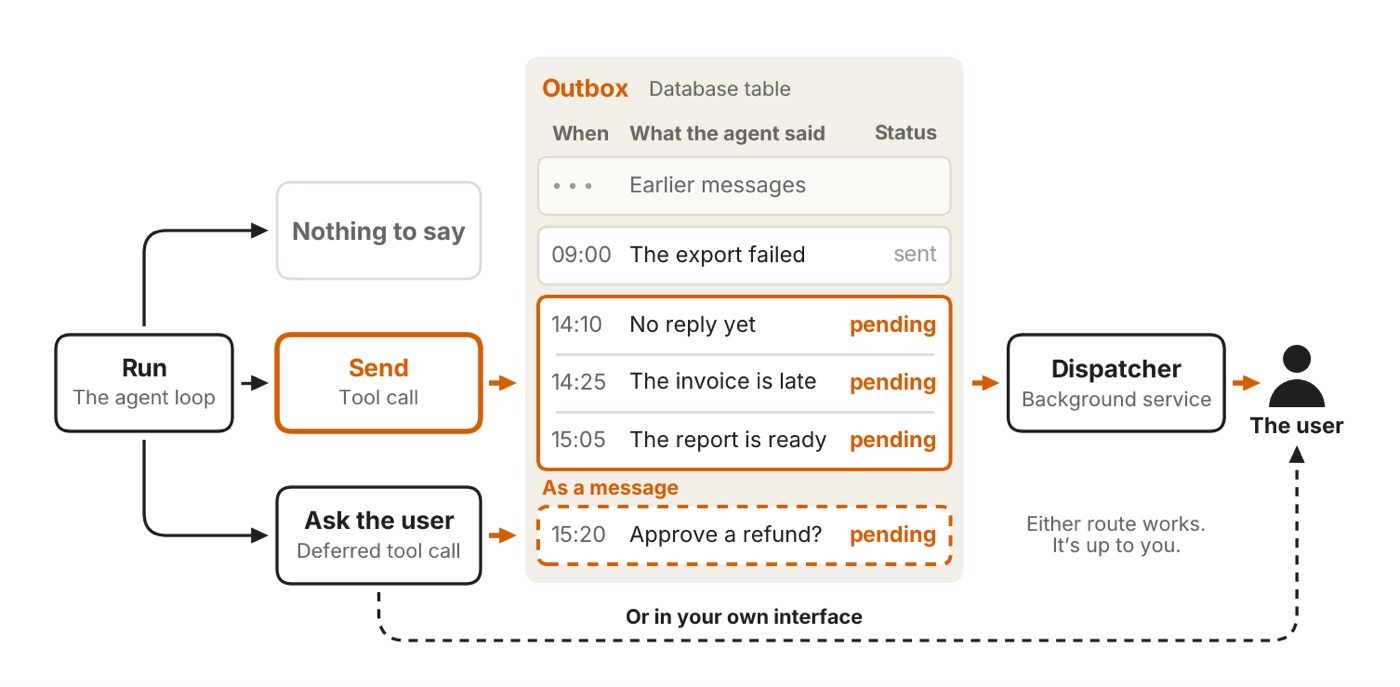
Silence is one of the three endings. Diagram from Anthropic's Building always-on agents, 13 November 2026.
Messages go into their own table and a dispatcher drains it. A plain send tool is often enough to start. The formal outbox earns its keep on pacing, and on recovering when delivery fails.
Then comes the hardest problem in the article, dressed as a note on tone: tune how much the agent says with evals, start quiet, earn attention over time.
Every other part of this design has a correct answer you can test. How often to speak does not. An agent that reports everything gets muted in a week, and a muted agent is worth nothing however good its inbox is.
Build first One channel, and a cap of one message a day for the first week.
Build the smallest one this week
The article is a design, not a tutorial. This part is the tutorial.
The smallest honest version: one person, one job, a weekend.
Paste this into a coding agent
The five primitives are Anthropic's design. The prompt below is mine: it asks a coding agent to scaffold all five for one job. Change the four marked lines and it builds yours instead.
Build a minimal always-on agent in this empty directory, using the five
primitives from Anthropic's "Building always-on agents": an event inbox,
timers, memory, permissions, an outbox.

Fill these in first:
  JOB:          tell me when a deal in the pipeline has had no reply for 10 days
  EVENT SOURCE: a JSON file at ./feed.json, one object per deal
  TIMER:        a sweep every weekday at 08:00
  NOTIFY:       print to stdout, prefixed [NOTIFY]

Rules for the build:
- Python 3, standard library and SQLite only. No packages, no network, no API keys.
- It must run with: python3 run.py
- Stub the model call as think(prompt, context) and the delivery as notify(text).
  Put a comment in each saying where the real one goes.

Build exactly these five things, nothing else:
1. INBOX. Table events(id, source_id UNIQUE, kind, payload, status, created_at).
   A handler writes a row and returns immediately, never calls think().
   Duplicates are rejected on source_id.
   Exactly one worker loop reads pending rows, batches everything pending
   into ONE run, marks them done.
2. TIMERS. Table timers(id, kind, due_at, recurrence, state), separate from the inbox.
   A scheduler pass finds what is due and writes an event into the inbox.
   A timer never starts a run itself.
3. MEMORY. A memory/ directory: instructions.md, index.md and reported.md are read
   at the start of every run; notes/ and progress/ are read only when the run
   needs them. The run writes to memory before it ends.
4. PERMISSIONS. A permissions.py with three lists: AUTO, ASK, NEVER.
   An action in ASK pauses the run, writes the question to the outbox, and saves
   the pending action so the answer arrives later as a new inbox event
   and resumes it.
5. OUTBOX. Table outbox(id, body, status). A dispatcher drains it.
   Cap delivery at one message per day for the first week.

Also write:
- README.md, 20 lines maximum, how to run it.
- seed.py that writes feed.json and puts two test events in the inbox,
  so I can watch one run end to end.

Do not add anything that is not on this list. No web framework, no scheduler
library, no retries beyond marking status.
Tested, not assumed: pasted into a fresh Claude Code session (2.1.316, Opus) in an empty directory, no follow-ups. It wrote 373 lines, and the result runs first time.
$ python3 seed.py
feed.json written with 4 deals.
inbox: #1 sweep (as if the 08:00 timer fired), #2 Initech just replied today.

$ python3 run.py
[agent] up. next sweep 2026-11-17T08:00:00. tick every 10s. Ctrl-C to stop.
[inbox] deal D1 Acme, last reply 2026-11-13
[inbox] deal D2 Globex, last reply 2026-11-04
[inbox] deal D3 Initech, last reply 2026-11-02
[inbox] deal D4 Umbrella, last reply 2026-10-06
[run] start, 6 event(s) in one batch: #1 sweep, #2 deal, #3 deal, #4 deal, #5 deal, #6 deal
[run] think() proposed 3 action(s) for 2 stale deal(s)
[perm] AUTO: report_stale D2
[perm] AUTO: report_stale D4
[perm] ASK: pausing on mark_cold D4
[run] end, 6 event(s) marked done
[NOTIFY] Globex (Sam Lee): no reply for 12 days, last 2026-11-04
         Umbrella (Kim Diaz): no reply for 41 days, last 2026-10-06
         Question: May I mark cold Umbrella (D4), silent 41 days?

$ python3 run.py answer yes
[inbox] answer 'yes' queued; the running agent picks it up
All five parts are in that transcript. Six events arrived separately and were handled as one run. The deal that replied today was dropped as a duplicate. Two stale deals were reported automatically. Marking one cold needed a human, so the run put the question in the outbox and ended rather than blocking. The answer came back as a new event and resumed the work, and reported.md now stops tomorrow repeating it.
It is a toy: think() is a stub and nothing talks to a real CRM. It is not a sketch. The five parts are wired to each other correctly, which is the tedious part and the one you do not want to write twice.
The three files worth keeping whatever you build on
-- every wake-up goes through this, whatever woke it
id          a row per event
source_id   UNIQUE. the upstream id. a repeat delivery dies here
kind        webhook | message | timer | answer
payload     whatever arrived
status      pending | running | done | failed
memory/
  instructions.md   every run    how I want this done. under a page, hard limit
  index.md          every run    one line per file in notes/ and progress/
  reported.md       every run    what it has already told me. stops repeats
  notes/            on demand    what it learned. one topic per file
  progress/         on demand    one file per open task, what is left
| It may do alone | It must ask first | It never does |
|---|---|---|
| Read anything | Email a customer | Delete anything |
| Write to its own memory | Change a record | Add a user |
| Post in one channel | Spend money | Touch billing |
Anything not on the list is a no. The middle column does not block anything: it writes the question to the outbox, saves what it was about to do, and ends the run.
Six decisions, in this order
- Pick a job a colleague would recognise as a duty. Tell me when a deal has gone quiet for ten days. Not "be my assistant". One job is the only version where "it said nothing today" is information rather than a bug.
- One source, one timer, nothing else. Whatever system already knows the thing, plus the daily sweep. Two sources on day one and you will spend the weekend debugging ordering.
- Build the inbox before the agent. It is the one step that is painful to retrofit, because serialising a running agent means touching every piece of it.
- Lay the memory out before the first run writes anything. Then keep the pointer rule: anything that can be fetched again gets a reference, not a copy.
- Write the permission list before the agent has credentials. Ten minutes, on paper, and the proxy holds the keys.
- Send the output where a person already is. One channel, not a dashboard. Nobody opens the dashboard, and then the agent is dead without anyone deciding to kill it.
The checklist
If you copy one thing out of this post, copy this.
[ ] events table: id, source_id unique, payload, status
[ ] handler writes the row and returns. no model call
[ ] exactly one worker per inbox. check this twice
[ ] reject on source_id, so a double delivery dies at the door
[ ] mid-run policy in a comment: queue | fold | interrupt
[ ] timers in their own table, fired into the inbox
[ ] memory/ as above. instructions.md under a page
[ ] credentials behind a proxy. the agent never holds a key
[ ] outbox table and a dispatcher, even if it only prints
[ ] a cap of one message a day for the first week
The first three mistakes
In order of how long they take to diagnose.
- Two workers on one inbox. Contradictory notes, work done twice, a memory file that keeps reverting. It arrives by accident the second time you deploy, and stays invisible until two events land together.
- Letting the session be the memory. Fine for a week, while the transcript still holds the context. Then it gets compacted and the agent is a stranger.
- Shipping it loud. Muted in a week, and a muted agent is worth nothing. One message a day from a run that could have sent six.
None of these five parts is a model capability. A better model makes each run smarter. It does not give the agent an inbox, a memory that survives a restart, or a way to ask without blocking. Those are tables, a worker, and a few decisions about who may interrupt whom.
Which means the gap between the teams that have working persistent agents and the teams that do not is not a model gap. It is the same gap it was when Coinbase's CEO described running three tiers of agents with a chief of staff on top: somebody built the plumbing.
Five parts. None of them is the model.

Founder of nativefirst.ai. Runs everything on agents and writes down what works.